> For the complete documentation index, see [llms.txt](https://adrasis.gitbook.io/console/llms.txt). Markdown versions of documentation pages are available by appending `.md` to page URLs; this page is available as [Markdown](https://adrasis.gitbook.io/console/sales-and-distribution/overview.md).

# Sales & Distribution overview

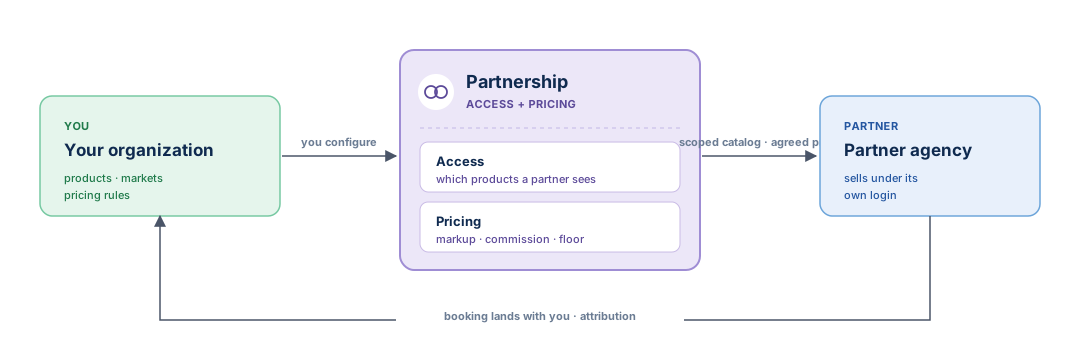
Sales & Distribution lets your organization give another agency the right to sell your products. You decide which markets and products the agency may sell and configure the amount it pays. The agency searches and books from its own login; every booking is recorded under your organization with the partnership attached.

This page explains the two controls behind every partnership — **access** and **pricing** — and how a booking flows back to you.

{% hint style="info" %}
**Your partner sells under its own login.** A partner agency does not get a second system or a shared account. It signs in as itself, sees the products you opened to it, and books at the price you set. Nothing is mirrored into a separate workspace.
{% endhint %}

<figure><img src="https://2136275255-files.gitbook.io/~/files/v0/b/gitbook-x-prod.appspot.com/o/spaces%2F5KCdaQhBoltBaPQD0D0Y%2Fuploads%2Fgit-blob-310e7fc10a6c891b9c047f552de950d259281d62%2Fsales-distribution-flow.svg?alt=media" alt="You configure a partnership of access and pricing; the partner agency sells your scoped catalog at the agreed price; the booking lands back with you with attribution"><figcaption><p>You configure a partnership — access and pricing. The partner sells your scoped catalog at the agreed price, and every booking lands back with you, attributed to the partnership.</p></figcaption></figure>

***

## Two controls behind every partnership

Access and pricing are set **independently**. One decides what a partner can sell; the other resolves the partner-payable price. Keeping them apart lets you change visibility without changing commercial terms, and vice versa.

<table><thead><tr><th width="160">Control</th><th>Answers</th><th>Set on</th></tr></thead><tbody><tr><td><strong>Access</strong></td><td><em>Which of my products can this partner see and sell?</em></td><td><a href="/console/sales-and-distribution/access.md">Access</a> + <a href="/console/sales-and-distribution/markets.md">Markets</a></td></tr><tr><td><strong>Pricing</strong></td><td><em>At what payable price — under which plan model, adjustment and floor?</em></td><td><a href="/console/sales-and-distribution/pricing-rules.md">Pricing rules</a></td></tr></tbody></table>

***

## How a partnership works

{% stepper %}
{% step %}

### Add the partner

Pick the agency from a searchable list, or create a new agency record on the spot. Choose its **source market** — the market it sells from — and the currency of the relationship.
{% endstep %}

{% step %}

### Open the products

Activate the **destinations** the partner may sell, then refine with an include/exclude list if you need to. A destination you do not activate stays invisible to that partner.
{% endstep %}

{% step %}

### Set the price

Configure market, agency or product-specific distribution adjustments. They apply to NET\_RATE supply; COMMISSIONABLE plans keep their guest-facing source price and supplier commission path. A minimum selling rate keeps promotions and discounts from going too low.
{% endstep %}

{% step %}

### The partner sells; the booking lands with you

The agency searches and books from its own login. The booking is recorded under your organization — you own the inventory — with the partnership attached so both sides can report the sale.
{% endstep %}
{% endstepper %}

{% hint style="warning" %}
**A market you do not activate is invisible.** Access is closed by default per destination. If a partner sells from Kosovo but you never activate the *Georgia* destination for it, that partner cannot see or sell your Georgia products.
{% endhint %}

***

## What stays private

Search and booking responses quote the amount payable under the partnership.

* **Search and booking retain their existing price projection.** Availability checks also provide their diagnostic trace and optional nightly price details, including floor-price calculations.
* **The partner's retail markup stays theirs.** What the agency finally charges its customer is private from you; only the partner sees its own retail layer.
* **One partnership never sees another.** A partner sees only its own terms, products and bookings. Other agencies' markets, prices and deals stay out of view.

## What this does not do

* **No wallet or credit line.** There is no in-app balance, credit limit or account aging.
* **No invoicing or general ledger.** Invoicing lives in your accounting program; Adrasis feeds it the figures, it does not replace it.
* **No currency conversion.** Each partnership settles in its own currency; Adrasis records native amounts and never converts them for you.

## Where to next

* **Create and run a partner** → [Partners](/console/sales-and-distribution/partners.md)
* **Scope partners by geography** → [Markets](/console/sales-and-distribution/markets.md)
* **Configure commercial pricing** → [Pricing rules](/console/sales-and-distribution/pricing-rules.md)


---

# Agent Instructions
This documentation is published with GitBook. GitBook is the documentation platform designed so that both humans and AI agents can read, navigate, and reason over technical content effectively. Learn more at gitbook.com.

## Querying This Documentation
If you need additional information that is not directly available in this page, you can query the documentation dynamically by asking a question.

Perform an HTTP GET request on the current page URL with the `ask` query parameter, and the optional `goal` query parameter:

```
GET https://adrasis.gitbook.io/console/sales-and-distribution/overview.md?ask=<question>&goal=<endgoal>
```

`ask` is the immediate question: it should be specific, self-contained, and written in natural language.
`goal` is optional and describes the broader end goal you are ultimately trying to accomplish on behalf of the user. GitBook uses it to tailor the answer towards what is most useful for that goal.

The response will contain a direct answer to the question and relevant excerpts and sources from the documentation.

Use this mechanism when the answer is not explicitly present in the current page, you need clarification or additional context, or you want to retrieve related documentation sections.
